Guide
Schedule Outbound Connection Syncs
Choose mapped connections and configure tenant-specific outbound schedules in ABM Warranty 0.6.0 beta.
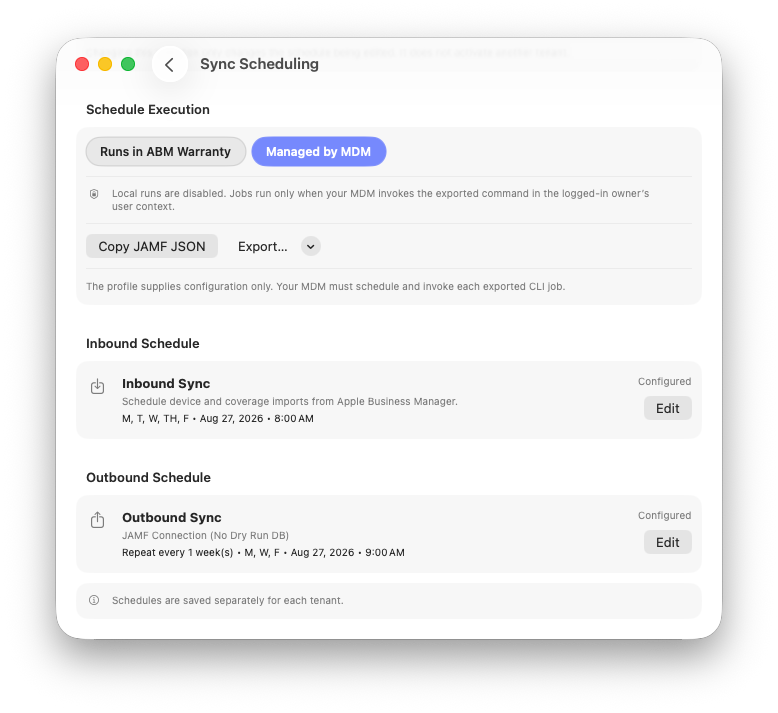
Inbound and outbound schedules are optional and saved separately for each tenant.
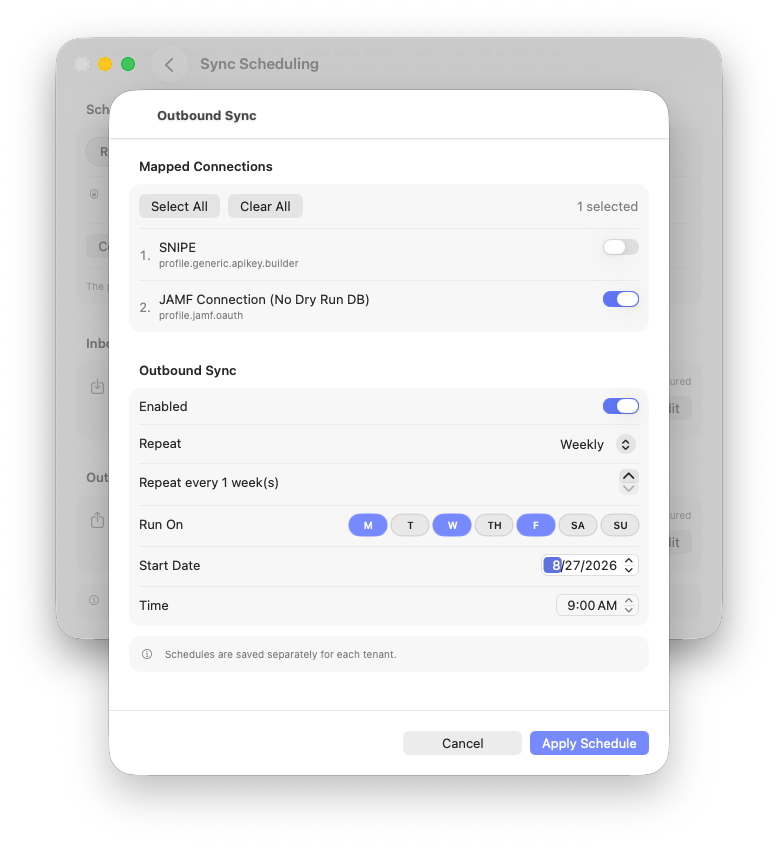
Select the mapped outbound connections to run, then configure and apply the recurrence.
Use an outbound schedule to send a tenant's data through explicitly selected outbound connections. ABM Warranty preserves the saved connection order and validates the entire selected set before any outbound writes begin.
Beta: This article describes ABM Warranty 0.6.0, build 29. Beta behavior may change before general release.
Before You Begin
- Create and enable each outbound connection.
- Map each connection to the tenant and put the mappings in the required execution order.
- For MDM execution, ensure the CLI runs as the logged-in tenant owner so it can reach the correct Keychain items and tenant database.
Configure an Outbound Schedule
- Open Sync Scheduling and select the Schedule Tenant. Changing this selection changes only the schedule being edited.
- Under Outbound Schedule, select Edit.
- Under Mapped Connections, turn on every connection that this schedule should use. Select All and Clear All are available for the visible mapped set.
- Turn on Enabled.
- Choose Daily, Weekly, or Monthly, then configure the supported interval or monthly day.
- Select any applicable Run On day pills, then set the Start Date, Time, and schedule time zone.
- Select Apply Schedule.
Warning: Available connections are not selected automatically. An outbound schedule requires one or more explicitly selected, mapped connection IDs.
Connection Validation
Before outbound writes begin, every selected connection must still:
- exist;
- be enabled; and
- have a valid mapping to the scheduled tenant.
Connection IDs are authoritative. Display names and profile IDs are informational. If any selected connection fails validation, correct the mapping or selection before retrying.
Use Jamf Pro or Another MDM
- Select Managed by MDM. This disables local execution for the selected tenant while preserving its inbound and outbound definitions.
- Save the schedule.
- Select Copy JAMF JSON, or open Export... and choose Managed Preferences Plist... or Unsigned Mobileconfig....
- Deploy the configuration with your MDM.
- Separately create the recurring MDM policy, script, or command that invokes each exported job.
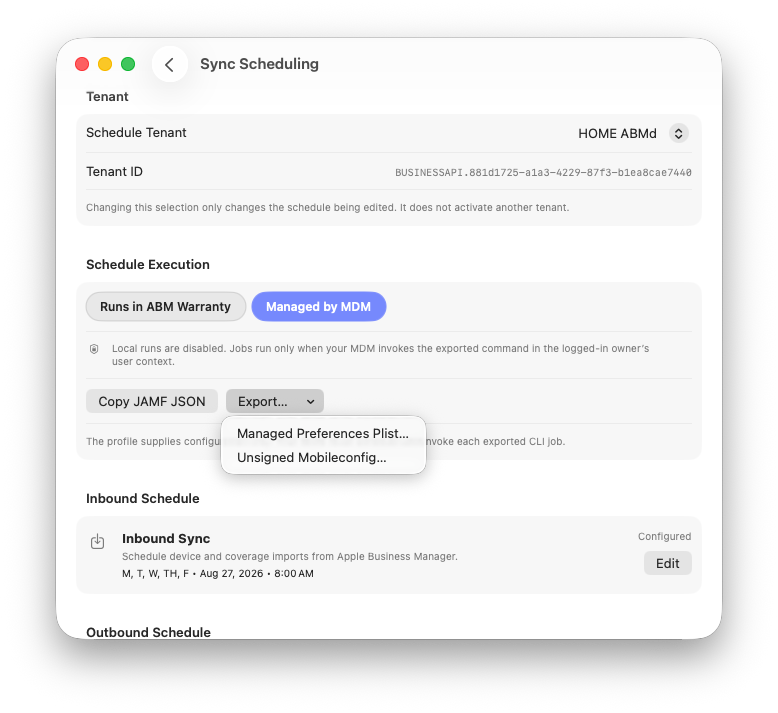
Export configuration after saving the schedule; deployment and command execution remain separate MDM actions.
The export includes version requirements, tenant metadata, job definitions, schedule revisions and recurrence, selected outbound connection IDs, display-only names and profile IDs, and CLI arguments. It never includes API credentials, private keys, tokens, authentication secrets, outbound secrets, or connection URLs.
Warning: Exported mobileconfig files are unsigned. Review and sign them according to your organization's security requirements before deployment. A configuration profile supplies configuration only; it does not execute ABM Warranty.
Review Scheduled Outbound Runs
Scheduled Sync Jobs shows projected occurrences and scheduled-run history. Expand a historical row for job statistics and errors. The underlying run also appears in Outbound Sync Jobs with a scheduled indicator and, where available, a link back to schedule preferences. Local runs use the trigger scheduled; MDM runs use managed-scheduled.