Guide
Viewing Logs
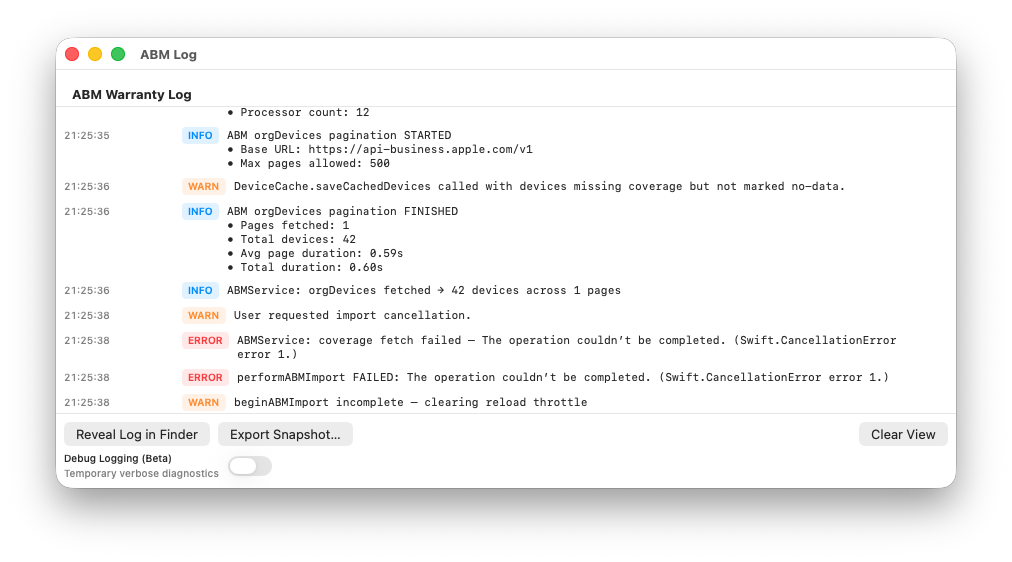
ABM Warranty includes a dedicated Log window that displays authentication, API activity, import progress, retries, and error conditions in real time. Logs are designed to provide clear visibility into what the application is doing and why, without interrupting normal use.
Logs are tenant-aware. Each log entry is automatically associated with the active tenant (Apple Business Manager credential) at the time the event occurs. When viewing logs, entries are filtered to show:
- Events specific to the currently active tenant
- Global application events not tied to a specific tenant
This ensures that activity from different credentials or organizations is never mixed together, even when multiple tenants are configured.
Each import session begins with a status snapshot that is written to the log. This snapshot records important contextual information, including:
- Application version and build number
- Active tenant identifier
- Credential presence and validity
- Device counts and inactive device totals
- Import state and throttling conditions
Status snapshots allow logs to be reviewed later with full awareness of the application’s state at the time the data was collected.
During imports, logs record pagination progress, coverage batch activity, retry attempts, rate-limit backoff events (HTTP 429), and server errors. These events are summarized visually in the Status Dashboard while full detail remains available in the log view.
Logs are written both to the in-app Log window and to files stored in the user’s Library folder. The Log window includes controls to reveal the current log file in Finder and to export a diagnostics snapshot for support purposes.
When requesting support, copying relevant log entries — especially the initial status snapshot and any subsequent error messages — can significantly speed up troubleshooting. Logs never include private keys, PEM contents, or other sensitive credential material.