Guide
Filters
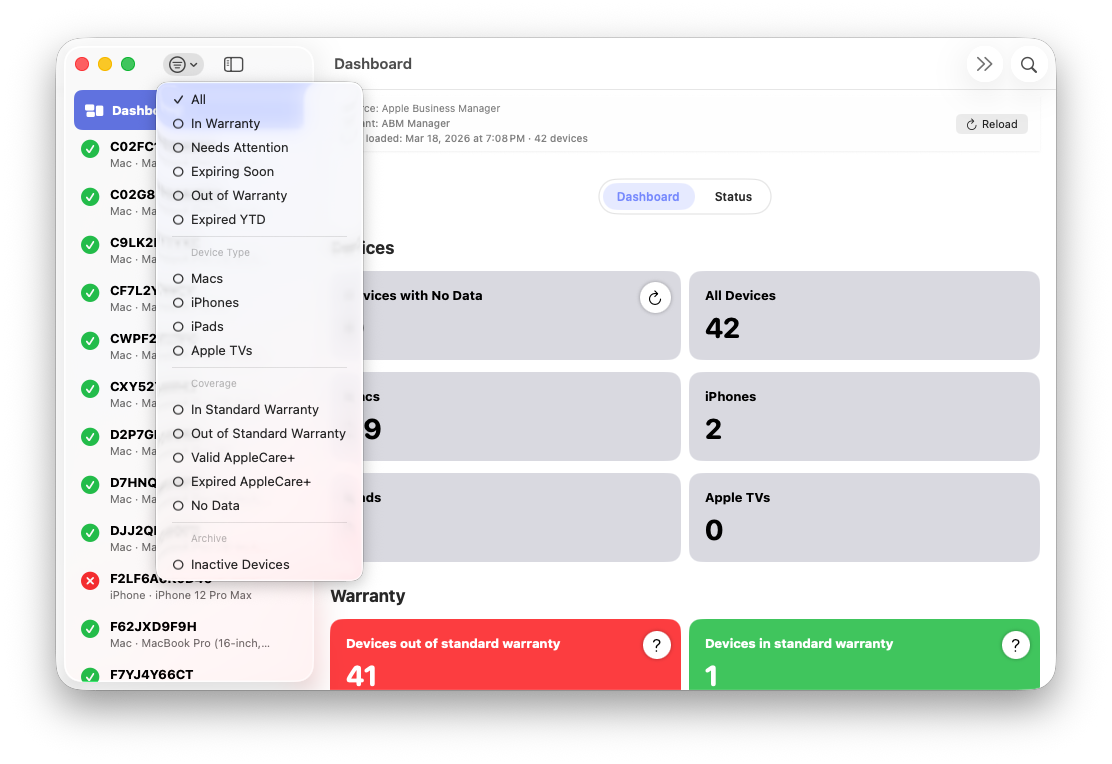
Filters allow you to narrow the device list for the active tenant based on warranty status, coverage state, device type, or lifecycle state. Filtering updates the device list, Dashboard counts, and navigation instantly.
Warranty & Coverage Status
Coverage-based filters group devices by their current warranty condition as reported by Apple Business Manager and derived by ABM Warranty:
- In Warranty – Devices with active standard warranty
- Out of Warranty – Devices with expired standard coverage
- Needs Attention – Devices nearing expiration or with coverage anomalies
- Expiring Soon – Devices approaching warranty end dates
- Expired YTD – Devices whose coverage expired earlier in the current year
AppleCare+ Coverage
AppleCare+ filters isolate devices with extended coverage:
- Valid AppleCare+ – Active AppleCare+ coverage
- Expired AppleCare+ – AppleCare+ coverage has ended
Device Type
Device-type filters group devices by Apple-reported hardware family:
- Mac
- iPhone
- iPad
- Apple TV
No Data & Inactive Devices
Some devices may not return coverage information or may no longer be present in Apple Business Manager:
- No Data – Active devices where coverage data could not be retrieved. These devices support targeted retry without reloading the full device inventory.
- Inactive – Devices no longer returned by Apple Business Manager. Inactive devices are retained locally for historical reference and are never deleted automatically.
Dashboard Integration
Dashboard tiles act as filter shortcuts. Selecting a tile automatically applies the corresponding filter and updates the device list to match the selected category.
CSV Export Behavior
Filters apply directly to CSV exports. When exporting, only the currently visible devices for the active tenant are included, and the export preserves the current sort order.
Persistence & Live Updates
Filters remain active during imports. As new data is streamed in, Dashboard counts and the device list update continuously without blocking the user interface.