Guide
Dashboard Overview
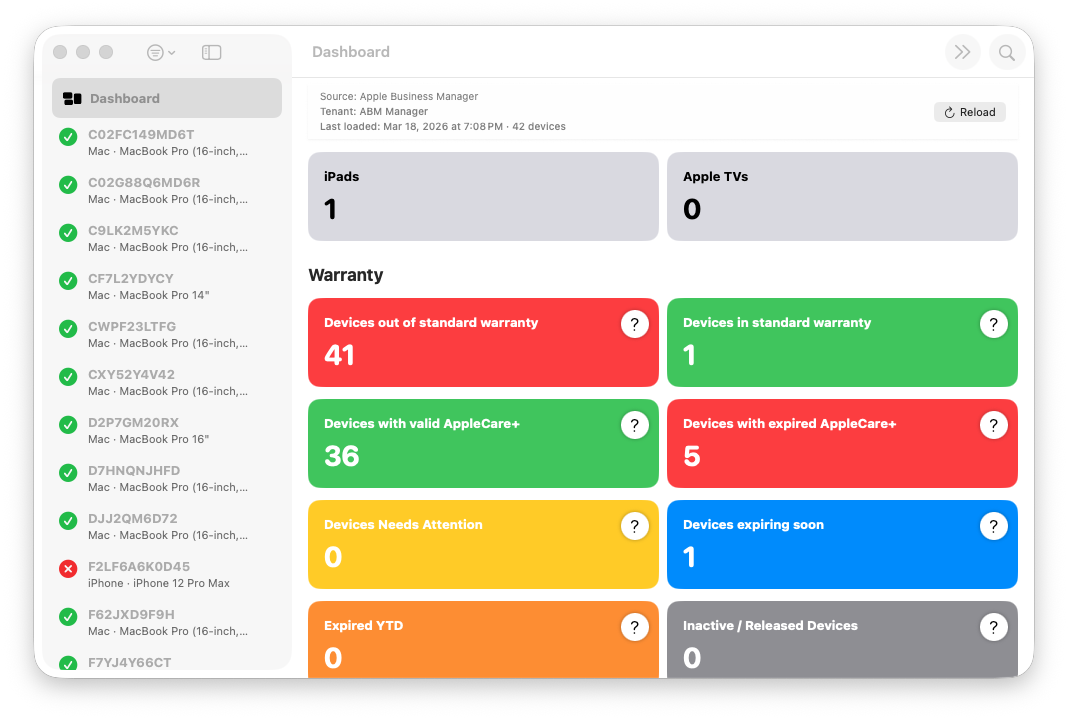
The Dashboard provides a real-time summary of the currently active Apple Business Manager tenant. It is designed to surface credential health, import status, device counts, and coverage telemetry at a glance.
The Dashboard reflects the active credential only. When multiple credentials are configured, switching tenants updates the Dashboard immediately to show data and health information for the selected tenant.
Dashboard status cards summarize key operational and data points, including:
- Credential configuration and PEM resolution status
- Last import outcome (success, failure, or in progress)
- Import timing, duration, and device page counts
- Total devices loaded for the active tenant
- Retry, rate-limit, and server error telemetry
- Post-fetch analysis warnings, if present
All values update dynamically during imports and retries without blocking the user interface. Progress, retry behavior, and throttling backoff are reflected as they occur.
If devices are no longer returned by Apple Business Manager, they are retained locally and marked as inactive. Inactive devices remain visible for historical reference and are included in Dashboard counts and diagnostics.
When credentials are missing, incomplete, or invalid, the Dashboard remains visible but indicates that live imports are unavailable. In this state, ABM Warranty may operate using sample data or diagnostic mode until valid credentials are configured.
The Dashboard is informational only. It does not modify data and does not trigger network operations on its own. All actions are initiated explicitly by the user.